Inside
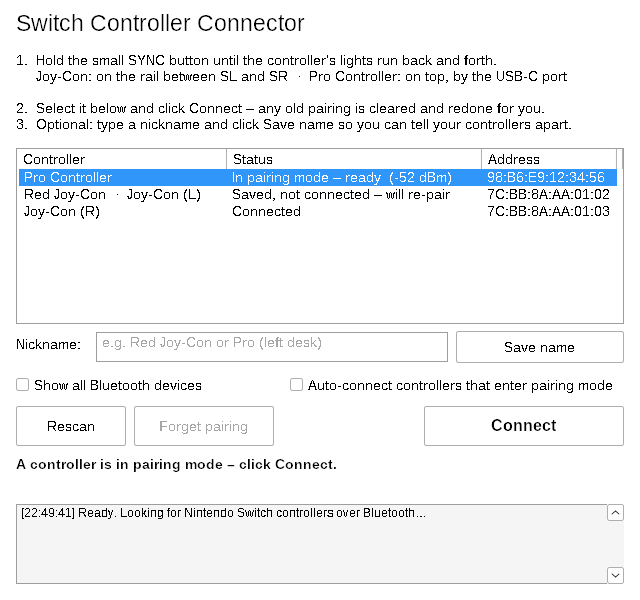
Switch Controller Connector
Connects Nintendo Switch controllers to a Windows PC, even the ones Windows won't reconnect.
Once a Joy-Con or Pro Controller has been used with a Switch, Windows usually won't connect it again. This app clears the old connection and pairs it again in one click.
Windows only. There's no version for Mac, Linux, Android or iPhone.
Why I built it
Connecting my Nintendo Switch controller to my PC was a disaster every single time. That's why this exists.
How it works
- Step 1
Hold SYNC
Hold the small SYNC button on the controller until its lights run back and forth.
- Step 2
Click Connect
Pick the controller from the list and click Connect.
- Step 3
It sorts out Windows
The app clears the old pairing Windows was stuck on and pairs it again, retrying for about 45 seconds.
- Step 4
Start playing
That's it. The lights keep flashing on a PC, and that's normal.
What it can do
Auto-connect
Connects any controller the moment it goes into pairing mode.
Nicknames
Name your controllers so you can tell them apart, in the app and in Windows' Bluetooth list.
Rescan
Starts the search again, and tries to switch Bluetooth on if it's off.
Nothing to install
It's one file. No installer and no admin rights.
Where it runs
- WindowsWindows 10 and 11
Good to know
- Works with Pro Controllers and Joy-Con.
- Windows may warn you the first time, because the app isn't signed. Click More info, then Run anyway.
- Windows only. There's no version for Mac, Linux, Android or iPhone.