
Inside
Auto Clicker
A tiny left-click auto clicker for Windows that starts and stops with one key, from any window.
Auto Clicker clicks the mouse for you, as fast or as slowly as you like. Start and stop it with one key, from any window.
Windows only. There's no version for Mac, Linux, Android or iPhone.
Why I built it
I made it to click through the questions Claude asks me while it works, so I don't have to sit there and do it myself. It comes in handy for plenty of other things too.
How it works
- Step 1
Set the speed
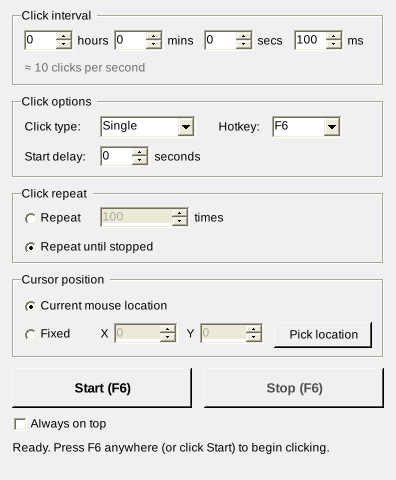
Choose the gap between clicks, from milliseconds to hours. It shows roughly how many clicks a second that makes.
- Step 2
Choose where
Click wherever the mouse is, or pick a fixed spot on the screen.
- Step 3
Press F6
It starts clicking. Press F6 again to stop, from any app.
What it can do
Single or double
Pick a single or double left click.
As many as you need
A set number of clicks, or keep going until you stop it.
Start delay
Give yourself a few seconds to get ready, and keep it on top of other windows.
Remembers your settings
Everything is how you left it next time you open it.
Tiny
One 46 KB file, with nothing to install.
Where it runs
- WindowsWindows 10 and 11
Good to know
- If clicks don't register in a game, that game is probably running as administrator. Right-click Auto Clicker and choose Run as administrator.
- Windows may warn you the first time, because the app isn't signed. Click More info, then Run anyway.
- Windows only. There's no version for Mac, Linux, Android or iPhone.